
PhysicsScene and the Solver
The USD scene is a prim tree. So where do settings like "how strong is gravity" or "how are collisions resolved" live? The answer: those are also prims. Specifically, a PhysicsScene prim.
Physics Is Also a Prim
The scene contains a single prim of type PhysicsScene that holds the physics parameters for the entire simulation.
Rendering diagram…
When a run starts, the code scans the scene for a prim of type PhysicsScene and applies gravity, solver iterations, and other values from it. That single prim's settings apply globally to every rigid body in the scene — it is the physics "global settings panel."
- gravity: gravity vector (typically -9.81 m/s² in Z)
- solverIterations: iterations for resolving contact and joint constraints. More iterations = more stable but slower
- broadphase: the phase that quickly narrows down collision candidates
- GPU dynamics: whether to offload physics to the GPU
solverIterations — the Value the Asset Authored, and the Ceiling We Imposed
Of the parameters listed above, solverIterations is not simply "higher is more stable." Whoever built the robot USD already wrote a value in. And we were cutting that value down to the PhysX 6.0 TGS recommendation (16 position iterations, 4 velocity). The run log carries the trace:
[ENV-DIAG] PhysicsScene count=1 paths=['/physicsScene']
[IsaacCore] /World/Robots/HO_A: TGS-ITER capped 2 attr(s) — vel<=4 / pos<=16
[Isaac] PhysX solver iterations: pos=[1,255], vel=[0,255]
For most robots that ceiling is right. Mechanisms that close a kinematic loop are different: a closed loop accumulates constraint error every step and the solver has to work it off, which is precisely why the author asked for more iterations.
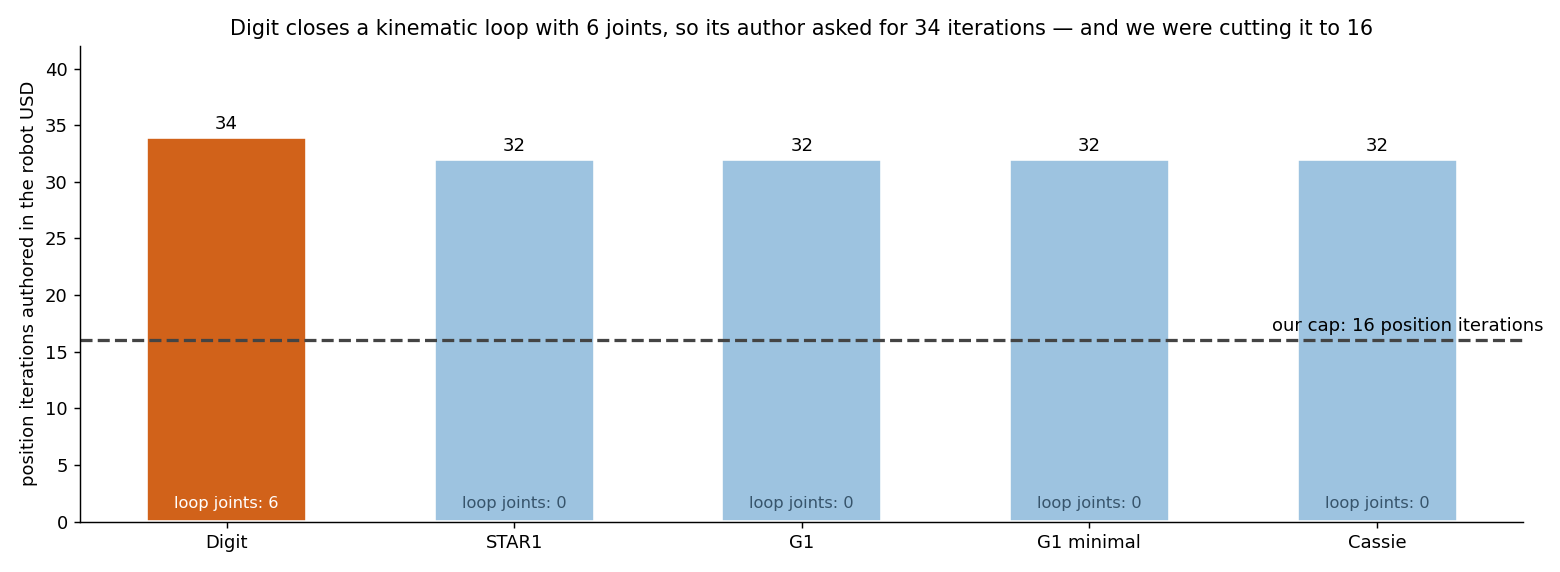 Position iteration counts authored into the USD of the robots we currently run. Only Digit closes a loop — six loop joints — and asks for 34, with our ceiling of 16 slicing straight through it. The others have zero loop joints, so the ceiling never bites.
The more awkward part was that two places in our own code disagreed. One capped unconditionally at 16; the other, a policy registry, stated that "solver iterations use USD defaults (34 pos / 4 vel) for constraint convergence." It was only settled by opening the assets and counting. Assets with loop joints now keep their authored value; everything else is capped as before.
⚠️ "Respect the asset's defaults" and "cap to the recommended value" are both reasonable, which is exactly how they survive in two places at once. Which one actually runs is answered by the log, not the docs — that
TGS-ITER cappedline was the answer.
PhysX Is the Default — Kinematic Is Only a Shortcut
One firm principle applies here: physics is solved for real with PhysX. Driving robots with forces and torques through PhysX simulation is the default. Moving objects by directly setting their position (kinematic mode) is an aid for fast prototyping — nothing more.
💡 Why kinematic workarounds are wrong — bypassing PhysX to mask a physical bug like rollover or slip makes the problem disappear on screen, but that is avoidance, not validation. Sim-to-Real fidelity only comes from solving real physics with PhysX.
GPU Dynamics Activates After Reset
The world.reset() boundary described in the boot order post shows up here too. PhysX locks in GPU dynamics settings and collision filters at reset time.
Rendering diagram…
⚠️ Attempting to change collision filters or fixed joints after reset has no effect — they are already locked. Physics configuration must be finalized before reset.
When a single physics engine is not enough (ground, surface, underwater, and acoustic physics each follow different equations), multiple engines must be synchronized to a shared time axis. That multi-physics orchestration is covered in a separate post.
In a nutshell
📌 Physics settings live in the PhysicsScene prim — a single node that broadcasts gravity, solver iterations, and GPU dynamics to all rigid bodies in the scene. PhysX is the default and kinematic mode is only a test shortcut. GPU dynamics and collision filters are locked in at
world.reset().
References
See standard test results with videos and verdict evidence on the imSim Portal.
View public results →