
Composing a Scene with USD
In Isaac Sim, a "scene" is not one enormous 3D file. It is a tree of prims (primitives) on a USD (OpenUSD) stage. Once you understand this structure, "how do I put multiple robots into one environment?" becomes natural.
Stage = Stage; Prim = Everything on It
- Stage: the container for the entire scene. One simulation = one stage.
- Prim: every node on the stage. Meshes, lights, cameras, robots, physics scenes — all are prims.
- Prim path: the tree address of each prim, formatted like a file path (
/World/robot_0,/World/defaultGroundPlane).
Rendering diagram…
The fact that the prim path is a tree address matters because controlling a specific robot joint later means addressing that joint by its exact prim path.
How the Scene Is Assembled — Inserting via Reference
The core operation for building a scene is referencing. A pre-built environment USD and a pre-built robot USD are each inserted under a specific prim path in the stage as references. (Isaac's add_reference_to_stage handles this.)
Rendering diagram…
The advantages of this reference-based approach are significant.
- Reuse: reference the same robot USD at multiple prim paths → N identical robots in one line
- Non-destructive: the source USD is untouched; only overrides (position, color, material) are layered on in the stage
- Composition: environment, robots, and sensors each come from separate files and are assembled onto one stage
Simple objects that are created at runtime — obstacles, for example — are defined directly as basic geometry prims (Cube, Sphere, Cylinder) inline on the stage, requiring no external file.
⚠️ One firm rule: if an environment fails to load, silently substituting a bare floor (primitive fallback) is not acceptable. That produces a world without walls, leading to the same false-success problem as an empty map. Failures must surface as errors.
The Cost of Assembly Sits in One Place
A run's scene is several files combined: one warehouse environment, one robot USD (referenced twice for two robots), several obstacle USDs. The cost, however, is not spread evenly.
[TIMING-LOAD] pre-ref kit.update (env realize): 6.5s
[TIMING-LOAD] post-ref kit.update 0: 0.4s
[TIMING-LOAD] post-ref kit.update 1: 0.0s
[REF-ADDED] /World/Robots/HO_A: valid=True children=10 src=.../husky_a200.usd
[IsaacCore] Using defaultPrim: /husky
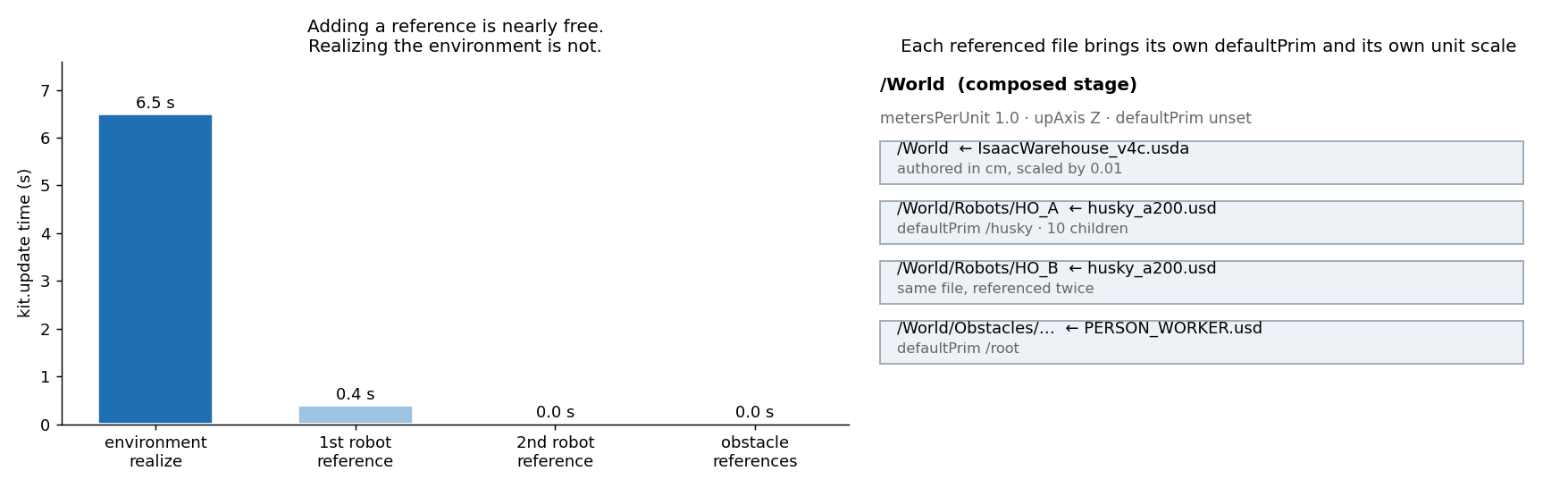 Left — realizing the environment costs 6.5 seconds, after which inserting references costs 0.4 seconds and then nothing. Right — the composed stage and the files inserted into it. Each file brings its own defaultPrim, and the warehouse environment was authored in centimetres, so a 0.01 scale is applied.
Two things follow. First, inserting a reference is essentially free — adding a second robot does not double the load time. Second, each file brings its own conventions. defaultPrim differs per file (/husky, /root), and so do units: the composed stage is in metres while the warehouse original is in centimetres, carrying a 0.01 scale.
⚠️ Units are a property of the file, not of the scene. Insert a mis-scaled asset and it is that asset, not the whole scene, that ends up 100× too large or small — and the run will happily proceed that way.
Why USD
USD was created by Pixar to let large teams of artists collaborate on massive animation scenes without stepping on each other. Its "layer, reference, and override — non-destructive composition" philosophy maps perfectly to robot simulation — environments, robots, sensors, and scenarios each evolve independently and then compose together on one stage. (USD's layer composition rules are covered in a separate post.)
In a nutshell
📌 An Isaac Sim scene = a tree of prims on a Stage. Environments and robots are inserted as USD references (referencing the same file multiple times spawns N copies); simple obstacles are defined directly as geometry prims inline. The prim path is the address used to control each object later.
References
See standard test results with videos and verdict evidence on the imSim Portal.
View public results →