
Why Physics Runs at 200 Hz and Rendering at 60 Hz
When building a simulation loop, a natural question arises: "Can't we just run physics once and render once per frame?" In practice, that approach leaves physics unstable and rendering wasteful. The solution is to decouple the physics and rendering rates.
Physics Often, Rendering Occasionally
The core idea: within a single main loop iteration, step physics multiple times (substeps) and render only once (or less frequently).
Rendering diagram…
Looking at the timeline:
Physics tick:  | | | | | | | | | | | | | | | | | | | |   (dense, 200 Hz)
Render frame:  |          |          |          |        (sparse, 60 Hz)
               └─── multiple physics substeps per loop iteration ──┘
physics_substeps = round(rendering_dt / physics_dt) — this determines how many physics steps fit between renders. A smaller physics dt (higher frequency) yields more stable integration; rendering is expensive, so it runs only as often as needed.
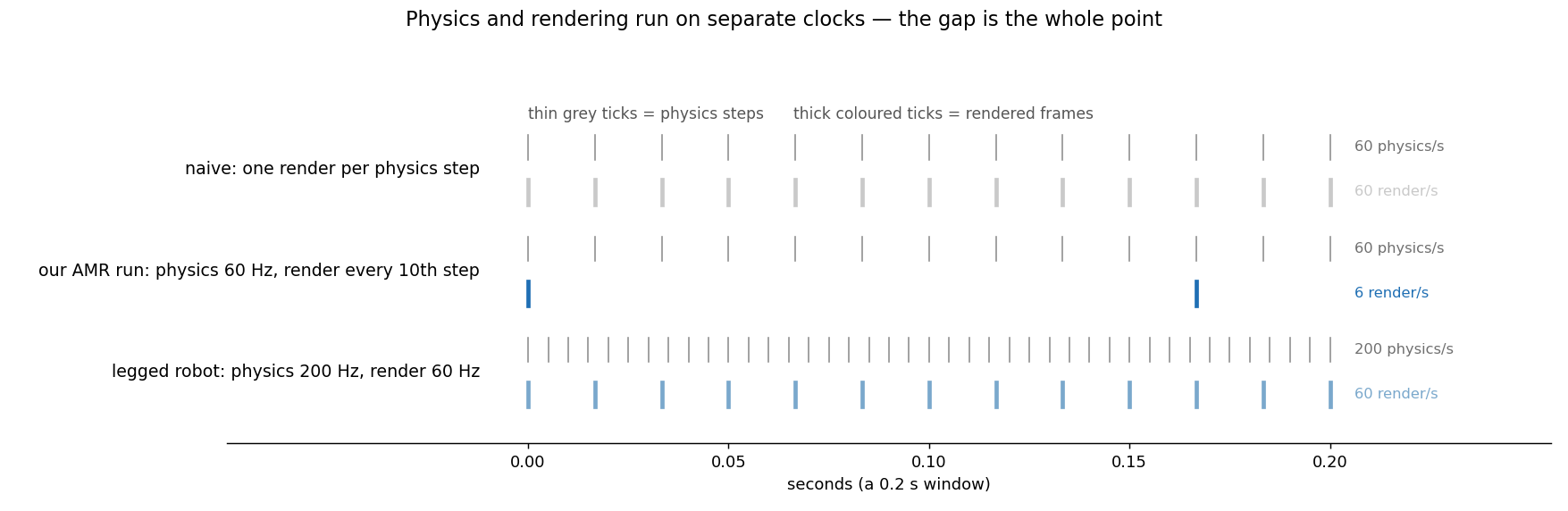 The same 0.2-second window under three settings. Thin grey ticks are physics steps, thick coloured ticks are rendered frames. The middle row is our warehouse AMR run's actual configuration — physics steps at 60 Hz but rendering only every tenth step, six frames per second. The legged robot at the bottom does the opposite, stepping physics at 200 Hz. Tie the two together as in the naive row on top and every increase in physics frequency drags the render cost along with it.
Drawing one frame in ten does not make rendering cheap. In that run's stage profile, HLS capture alone consumed 22.7% of the average tick. Reclaiming that share for physics means spacing renders out further; wanting more frames means giving physics budget back. Separating the two clocks is exactly what lets you make that trade by hand.
The loop structure is obvious in code.
# one loop: physics many times, render once
substeps = round(rendering_dt / physics_dt)   # e.g. 200Hz / 60Hz
while running:
    for _ in range(substeps):
        physics.step(physics_dt)              # fine-grained (stability)
    render()                                  # occasional (performance)
Why Physics Needs a Fine-Grained Timestep — Stability
With a large timestep, physics integration diverges or causes tunneling (objects passing through each other). Fast collisions and strong contacts demand a small dt.
💡 60 Hz is not enough for legged robots — The strong contact forces at foot-strike mean quadruped and biped robots collapse or tilt at 60 Hz. Running physics at 200 Hz or higher is required for stable standing. A slow-rolling AMR, by contrast, is fine at lower rates.
Why Rendering Can Afford a Coarse Timestep — Performance
Rendering (especially RTX) is expensive. For physics validation and trajectory collection, you don't need a new frame drawn at every physics tick. Decoupling — "physics at 200 Hz, render at 10–60 Hz" — conserves GPU budget.
⚠️ That said, rendering is still required in headless mode in some cases — HLS streaming, video recording, RTX sensors, and synthetic data all consume render output. The point that "headless ≠ no-render" is covered in a separate post.
Separating the physics and rendering time axes lets you capture stability (high-frequency physics) and performance (low-frequency rendering) simultaneously.
In a nutshell
📌 Within a single loop, physics steps multiple times (substeps, e.g., 200 Hz) while rendering runs occasionally (e.g., 60 Hz). High-frequency physics provides stability (especially for legged-robot contact), low-frequency rendering saves GPU budget —
substeps = round(rendering_dt / physics_dt)bridges the two.
References
See standard test results with videos and verdict evidence on the imSim Portal.
View public results →