
Costmap 2D Dissected
Most people picture a costmap as "a single map with obstacles drawn on it." It is not. Nav2's costmap is a composite built by stacking multiple layers — much like layers in a photo editor. Understanding this structure solves about half of all navigation debugging problems.
The Three Layers
The most basic costmap is built from three layers.
Rendering diagram…
- Static Layer — the unchanging map (derived from the occupancy grid covered earlier). Walls, columns, shelves.
- Obstacle Layer — obstacles the LiDAR sees right now. People, other robots, newly placed boxes. Updated every scan.
- Inflation Layer — wraps a cost gradient around obstacles to compensate for robot size (the subject of the next post).
Each cell's final cost ranges from 0 (free) to 254 (lethal — absolutely impassable), reflecting the merged information from all three layers. The path planner treats this cost as a "toll" and finds the route with the lowest total.
The rule for merging the three layers is one line — the max at each cell.
# master costmap = the max over all layers at each cell
def master_cost(cell, layers):
    return max(layer.cost(cell) for layer in layers)
    # static (walls) + obstacle (sensors, other robots) + inflation merged into one value
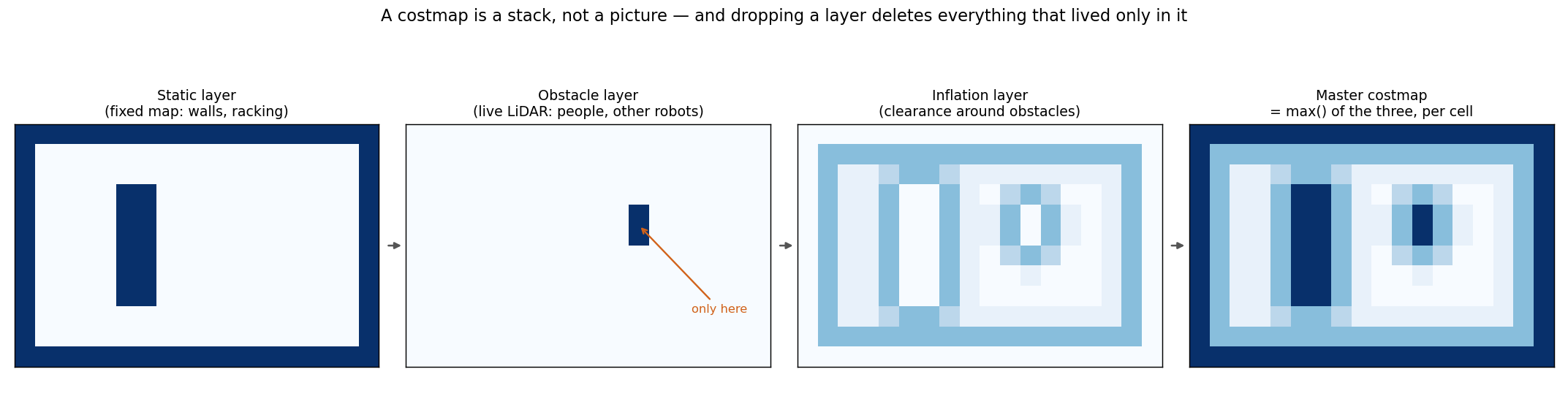 Three layers combining into one, taking the maximum at each cell. The racking exists only in the static layer, the other robot only in the obstacle layer, and inflation lays clearance around both. In the final costmap on the right, the other robot survives only because the obstacle layer is switched on — remove that layer and those cells vanish from this picture without a word.
Dropping the Wrong Layer — The Robot-Passthrough Bug
The layer architecture is powerful, but miscombining layers produces subtle bugs. Here is one we encountered.
When a static map already encodes all walls, a common optimization is to remove the LiDAR obstacle layer from the global costmap to stop LiDAR noise from causing path oscillation. That is a reasonable trade-off.
In a multi-robot environment, however, it became a trap.
Rendering diagram…
Other robots do not exist in the static map. They only appear in the obstacle layer (real-time sensor data). Once the obstacle layer was removed, robots became invisible to each other and their global paths overlapped.
The correct fix is not "remove everything" but selective composition — inter-robot collision data goes back into both local and global costmaps, while raw LiDAR noise is filtered only from the global. The core lesson: "removing a layer silently erases every piece of information that lived only in that layer."
This optimization has a less-discussed second half: when a static map is present, the obstacle layer is dropped from the local costmap too. The reasoning is the same — LiDAR marking the racking as an obstacle makes path following oscillate. But it comes at a price.
We measured that price on one of our warehouse runs. With a solid 2.95 × 2.00 m box standing 1.36 m in front of the robot, the local costmap (5 × 5 m at 0.05 m resolution) reported zero occupied cells all the way to its 100th callback. The green square on screen stayed "entirely free" throughout. Driving was fine, because walls and racking live in the global static map — but anything absent from that map (a person, a newly placed pallet, another robot) never enters the local costmap at all.
⚠️ "An empty layer" and "no obstacles nearby" look identical on screen — an all-green costmap overlay may not mean the surroundings are clear; it may mean that layer is switched off. Check the layer configuration before reading the picture.
Another Initialization Trap — Off Grid
A costmap's origin and size determine which region of the world it covers. When these are misconfigured, the robot or a goal pose can land outside the grid, producing a "Pose Goes Off Grid" error. The path planner cannot compute a route to coordinates it does not know about. Always verify that the costmap bounds cover the entire environment — including positive-quadrant extents.
In a nutshell
📌 A costmap is not a single map — it is a composite of static (fixed) + obstacle (real-time) + inflation (safety margin) layers. Optimizations that remove a layer silently erase everything that lived only in that layer (e.g., other robots). The right approach is selective composition, not wholesale removal.
References
See standard test results with videos and verdict evidence on the imSim Portal.
View public results →