
The Life of a Simulation Run
When a user hits "Run," a fairly long journey unfolds behind the scenes. A single order — a RuntimeConfig — passes through a queue, gets claimed by a worker, causes a runner to boot Isaac, steps physics, and eventually produces video and KPIs. This post traces that full cycle.
From Submission to Output
Rendering diagram…
- Submission — Send a RuntimeConfig via API (POST /runs). The run is recorded in the DB as
requested. - Queue — The orchestrator places the run in the wait queue. No GPU is consumed yet.
- Claim — When a worker's GPU node is free, it picks up (claims) the run and transitions it to
running. - Runner — Boots Isaac Sim, spawns the environment and robots, and steps physics.
- Output — Every tick, trajectory data is recorded, video is captured via HLS, and KPIs are accumulated.
- Cleanup — At the end, a verdict is assigned, video segments are muxed into an mp4, and resources are released (teardown).
Why Each Stage Matters
This division of responsibilities exists for a reason.
💡 Decoupling submission and execution — Separating a lightweight submission step from a heavyweight GPU execution step means submitting hundreds of runs at once is safe: they flow through the GPU at whatever rate it can sustain. "Submit = queue registration," not "submit = immediate execution," allows batches of thousands to be dispatched safely.
⚠️ A silent stall at the claim stage is dangerous — If a run never advances past
requested, the worker is failing to claim it. Causes include speculative pre-flight gates blocking the run or a dead node tunnel socket. Failures here produce no error message by design, so the first thing to check is the far end — node connectivity and gate conditions.
The Simulation Is Only One of the Phases
Laying out the timestamps of one real run makes the phases visible. This puts the database's state timestamps and the run folder's marker files on a single axis.
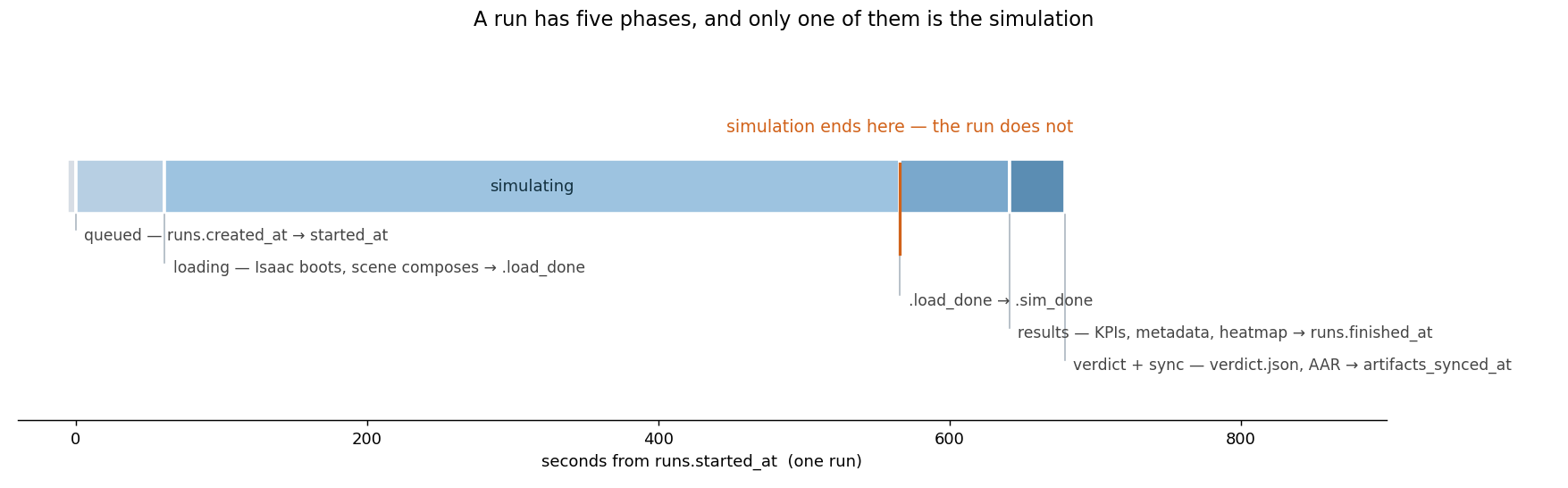 Five phases — queued; loading (Isaac boots and the scene composes, ending at .load_done); simulating (.load_done to .sim_done); results (KPIs, metadata, heatmap, ending at runs.finished_at); and verdict plus sync (verdict.json, AAR, ending at artifacts_synced_at). The run does not end where the simulation ends — results and the verdict are produced afterwards.
This is why there are two marker files rather than one. .load_done records "the scene came up" and .sim_done records "the simulation finished." Splitting them distinguishes a run that died during loading from one that died mid-simulation — with a single marker you would have to dig through logs to find out how far it got.
💡 When a run fails, look at the markers before the logs. No
.load_donemeans a scene or asset problem;.load_donewithout.sim_donemeans something during the simulation; both present but no verdict means the scoring and output stage. Three branches, separated by two files.
Where Do Outputs Come From?
When a run completes, everything lands under output/runs/{run_id}/ — per-camera mp4 files, trajectory logs, KPIs, event logs, and an AAR (after-action review). The video is produced by the HLS streaming pipeline as live segments during the run; these are muxed into an mp4 at teardown. This means the run must reach a clean teardown for the mp4 to be finalized — a hard-kill mid-run leaves only segments with no muxed output.
In a nutshell
📌 A run's lifecycle is submission (API) → queue (requested) → worker claim (running) → runner (Isaac boot, physics stepping) → output (trajectories, KPIs, video) → verdict and teardown. Submission and execution are decoupled to handle batches safely; video is finalized only at teardown; a run stuck in
requestedpoints to a claim-stage issue (gates or node connectivity).
See standard test results with videos and verdict evidence on the imSim Portal.
View public results →