
The RPP Controller
The planner has drawn the path — "here is where to go." Now that path must be translated into actual wheel velocities (cmd_vel) and followed. That is the controller's job, and the most widely used controller for AMRs is Regulated Pure Pursuit (RPP).
Chasing a Carrot — Pure Pursuit
The intuition behind Pure Pursuit is straightforward. Pick a lookahead point on the path ahead of the robot, then compute a smooth arc toward that point. A longer lookahead produces a smoother trajectory; a shorter one makes the robot more responsive.
Rendering diagram…
The "Regulated" qualifier means that the controller automatically reduces speed when curvature is high or obstacles are close. Key parameters:
- lookahead_dist — how far ahead to look
- desired_linear_vel — target forward speed
- rotate_to_heading — whether to rotate in place to align heading before moving
The heart of Pure Pursuit is a single curvature line.
# curvature of the arc toward the lookahead point -> cmd_vel
def pure_pursuit(lookahead_pt, lookahead_dist, desired_v):
    y = lookahead_pt.y                        # lateral offset in the robot frame
    curvature = 2 * y / lookahead_dist**2      # the arc through that point
    return desired_v, desired_v * curvature    # (vx, wz)
Rotation Stuck at 0.05 rad/s — the odom Clamp Bug
Here is a tricky bug we encountered. The robot needed to rotate but angular velocity was permanently pinned at 0.05 rad/s, barely turning at all.
Initial suspects — velocity_smoother, wheel drive, callbacks — were all wrong. Injecting logging into the topic chain and running once (instrument-first) pinpointed RPP itself as the culprit. RPP reads the current angular velocity from odom to limit acceleration. With simulation physics, odom can lag by one tick, making the controller read "current angular velocity ≈ 0." If max_angular_accel is set too low, each step adds only a tiny increment on top of ~0, locking the velocity at 0.05 in a vicious cycle.
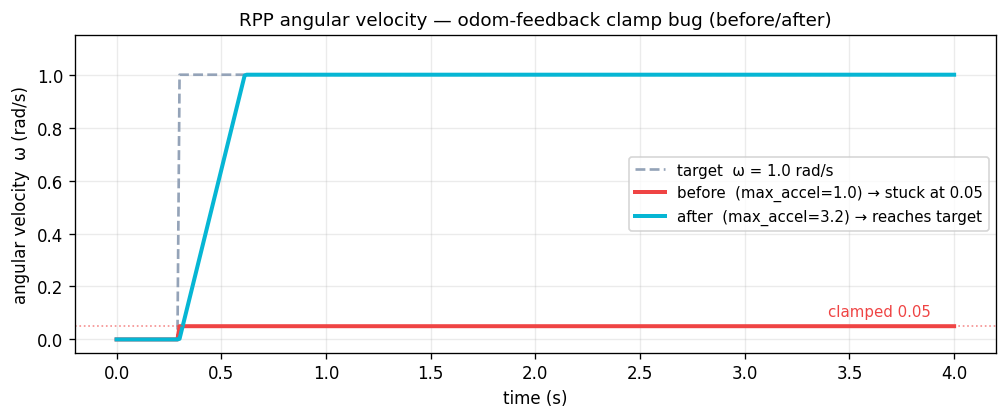 RPP angular velocity — odom feedback clamp bug. Target 1.0 rad/s: with accel limit 1.0 (red) the value is stuck at 0.05; raising it to 3.2 (cyan) allows it to reach the target.
The fix was raising the acceleration limit to a realistic value (max_angular_accel 1.0 → 3.2). As the chart shows, a single parameter change brought rotation back to life.
⚠️ Do not forget sim odom lag — when a closed-loop controller limits acceleration using odom feedback, the one-tick simulation physics lag can produce behavior that differs substantially from a real robot. The key to diagnosing this was not reading the code and guessing but instrumenting the topic chain to see where the value was clamping to 0.05 in live data.
💡 RPP output does not go directly to the wheels. It passes through velocity_smoother for smooth acceleration ramping. Keeping the controller → smoother → DriveAPI chain in mind makes debugging much easier.
In a nutshell
📌 RPP is the controller that tracks a lookahead point on the path via an arc to produce cmd_vel (with speed regulation based on curvature and proximity to obstacles). In simulation, odom acceleration clamping can pin rotation at 0.05 rad/s — the culprit was found not by guessing but by logging the topic chain.
References
See standard test results with videos and verdict evidence on the imSim Portal.
View public results →