
What Is an Occupancy Grid
Before an autonomous mobile robot (AMR) can roam a hallway, it has to answer one question first: "Is this a wall, or free space?" A human just looks and knows; a robot has to hold that world as numbers. The most fundamental of those representations is the occupancy grid.
This is the starting point of the series, so it runs a bit long and lays the foundation properly — what a grid is, how to choose the cell size, why it has to be a probability, whether 2D is enough, and how a real robot and a simulator build this grid so differently.
Slicing the world into a grid
An occupancy grid is a 2D map that divides the environment into square cells of a fixed size (e.g. 5 cm). Each cell holds one of three states.
- Occupied — where a wall, shelf, or obstacle is
- Free — empty space the robot can pass through
- Unknown — space the sensors haven't observed yet
Rendering diagram…
Below is a small warehouse drawn as a grid (■ = wall/shelf, · = free space):
■ ■ ■ ■ ■ ■ ■ ■ ■ ■
■ · · · · · · · · ■
■ · ■ ■ · · ■ ■ · ■
■ · ■ ■ · · ■ ■ · ■     ← two rows of shelves
■ · · · · · · · · ■
■ · · · ▣ · · · · ■     ← ▣ = robot's current position
■ ■ ■ ■ ■ ■ ■ ■ ■ ■
The core intuition is simple: it turns the continuous real world into a checkerboard of "passable / impassable" squares. But three decisions hide behind that simple picture: how finely to divide the cells (resolution), whether to treat each cell as 0/1 or as a probability, and whether a flat (2D) view is enough. Let's take them one at a time.
How big should a cell be? — The resolution trade-off
The first value you have to pick is the size of one cell (resolution). It must be neither too big nor too small — both extremes fail.
20cm cells:  a door (0.8m) = ~4 cells → smears into the wall, looks "blocked"
 5cm cells:  a door (0.8m) = 16 cells → "passable" is crisp
 1cm cells:  16x finer, but memory/compute scale with grid area, ∝ 1/resolution²
- Too coarse — a narrow gap or doorway smears into adjacent cells and disappears. The robot sees a door it could pass as "blocked," or misses a thin wall and runs into it.
- Too fine — the number of cells grows with the square of resolution. Going 5cm→1cm is 25× the cells. Memory and path computation explode.
💡 Match resolution to "robot size" and "smallest feature that matters" — if a 0.5m-wide robot has to pass a 0.8m door, you need to be fine enough to represent that 0.3m margin. For indoor AMRs, 3–10cm is usually the sweet spot. It's not "finer is better" — being one step finer than the smallest thing you must distinguish is enough.
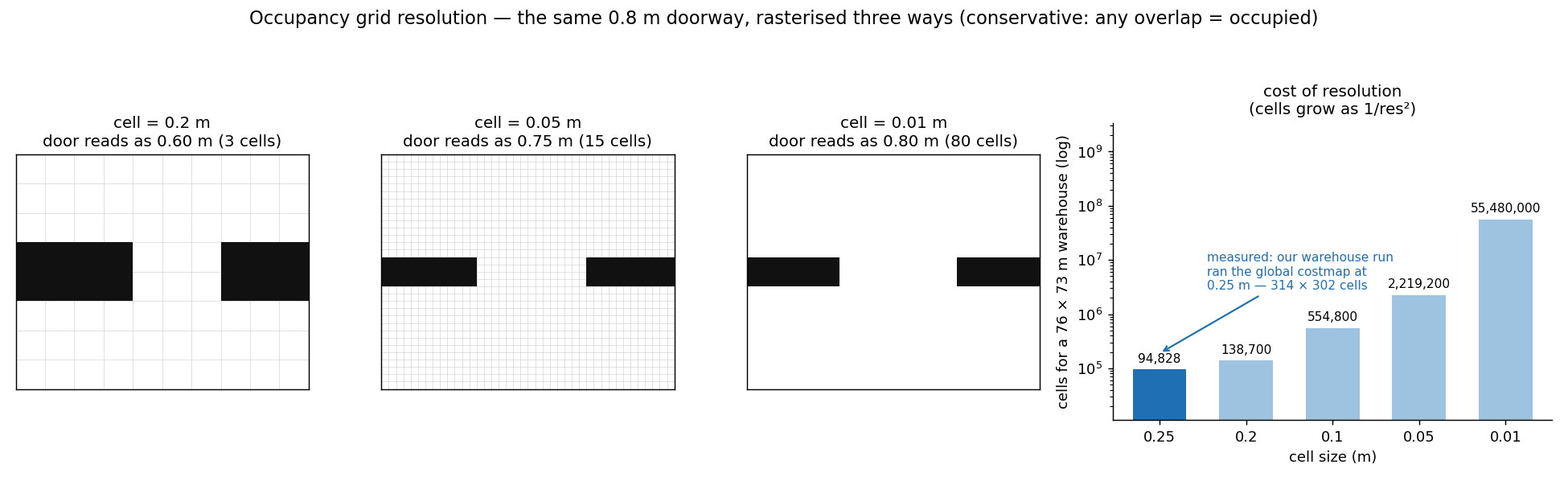 The same 0.8 m doorway rasterised at three resolutions. Costmaps mark conservatively — a cell that touches the wall at all counts as occupied — so unless the door lines up with the grid it loses a cell on each side: at 20 cm the 0.8 m door reads as 0.60 m (3 cells), at 5 cm as 0.75 m, at 1 cm as 0.80 m. On the right is the price: cells needed to cover a 76 × 73 m warehouse (log scale). Our warehouse run actually ran its global costmap at 0.25 m — 314 × 302 cells.
Why a probability — sensors lie
The checkerboard picture above makes it look like cells split cleanly into occupied/free, but reality isn't like that. Sensors are noisy. A single LiDAR return might be a glass reflection, a person walking by, or dust. Declaring "this is a wall" from one observation makes the map shaky.
So each cell holds not a 0/1 flag but an occupancy probability between 0 and 1. Observing the same cell repeatedly accumulates evidence — keep reading "blocked" and the probability approaches 1; conflicting reads leave it uncertain. If a person passes and the cell is briefly blocked then clears, later "free" observations pull the probability back down (handling dynamic obstacles).
The trick that makes this accumulation cheap is log-odds — it turns the multiplication of probabilities into addition, so each observation is just one add.
# update a cell's occupancy each time a sensor observes it (log-odds)
def update_cell(log_odds, hit):
    l_occ, l_free = 0.85, -0.4          # per-observation increment
    log_odds += l_occ if hit else l_free
    return clamp(log_odds, -5, 5)       # prevent divergence

def is_occupied(log_odds):
    return 1 / (1 + exp(-log_odds)) > 0.65   # probability -> occupied?
⚠️ Never trust a single observation — this is exactly why the occupancy grid is a probability. Update the map from one sensor frame and the noise becomes walls. Only a structure that grows confident as evidence accumulates yields a stable map amid the noise.
Is 2D enough? — The flat-floor assumption
Most indoor AMRs assume the floor is flat. Then a single 2D grid sliced at robot height is enough — light and fast. But there are places where that assumption breaks.
Rendering diagram…
- What 2D misses: overhangs like a desk (legs on the floor, top in the air), stairs, multiple floors, sloped rough terrain. A 2D grid that only looks at robot height misses the tabletop overhead or the drop underfoot.
- Then use 3D: a voxel (3D cell) representation like OctoMap, or a 3D costmap. Drones, legged robots, and off-road vehicles fall here.
The key point — a grid is a model of reality, not reality itself. 2D holds only on the flat-floor assumption; step outside it and you have to raise the dimension.
Why a grid at all
Despite all this complexity, the reason we still use grids is that they are overwhelmingly easy to compute on.
- Path planners (A*, Dijkstra) solve shortest paths directly on a "cell → neighbor cell" graph
- A safety margin (inflation) around obstacles can be laid down cell by cell
- Sensor updates localize to "raise/lower the probability of this cell" — no need to revisit the whole map
This occupancy grid is the very source of the next stage — static map → Nav2 costmap (covered in the next post).
A real robot does SLAM; a simulator knows the truth
The same grid is built in completely different ways on a real robot versus in simulation — and that difference is a major advantage for the simulator.
- Real robot: it is not given a map. It builds one as it moves, via SLAM — aligning consecutive LiDAR scans (scan matching) to jointly estimate its own pose and the map, and correcting accumulated error when it returns to a known place (loop closure). The grid is the output of this long process, laced with noise and drift.
- Simulation: we already hold the ground truth of the environment. When imSim generates a procedural environment, it reads the bounding boxes of every asset in the USD scene and rasterizes the grid directly — no SLAM, no drift, no waiting.
Rendering diagram…
💡 A perfect map for free is a verification weapon — on a real robot it's hard to tell whether navigation is wrong or the map is wrong. In simulation the map is ground truth, so you can isolate navigation problems from mapping problems. Because the grid is perfect, if the robot hits a wall it is purely a driving-logic problem.
That is why getting this grid right matters. If it's empty, or replaced by an all-free empty map, the robot drives straight through non-paths, blind to walls — a regression we actually hit, covered in the next post.
In a nutshell
📌 Occupancy grid = the continuous real world turned into a probabilistic checkerboard of "passable / impassable" squares. Match cell size to the robot and the smallest feature (too coarse and doors vanish; too fine and it explodes), accumulate each cell as a probability to survive noise (log-odds), and raise to 3D when the flat-floor assumption breaks. A real robot builds it laboriously with SLAM, but a simulator gets a perfect grid for free from ground truth — letting you separate mapping problems from driving problems.
References
- ROS 2 Nav2 — Costmap 2D · Static Layer (official docs)
- H. Moravec & A. Elfes, “High resolution maps from wide-angle sonar” (ICRA 1985) — the original occupancy grid paper
- A. Hornung et al., “OctoMap: An efficient probabilistic 3D mapping framework” (Autonomous Robots 2013)
- SLAM Toolbox (ROS 2) — building occupancy grids on real robots
See standard test results with videos and verdict evidence on the imSim Portal.
View public results →