
Nav2 Lifecycle and Behavior Trees
When you first bring up Nav2, it is common to hit the situation where "everything is running but the robot does not move." The cause is almost always one of two things: activation order or Behavior Tree configuration. Understanding these two reveals how Nav2 wakes up and how it works.
Nodes Come Up in Stages — Lifecycle
Core ROS 2 nodes do not simply start. They progress through lifecycle states: Unconfigured → Inactive → Active. Nav2's servers (map_server, planner, controller, behavior, bt_navigator, …) are all transitioned to Active by the lifecycle_manager in a prescribed order.
Rendering diagram…
Order matters because later nodes depend on earlier ones. bt_navigator, for example, cannot call planning and tracking unless planner and controller are already Active.
⚠️ TF delay halts everything — if the costmap activates before the coordinate transforms (
map → odom → base_link) are ready, the costmap stalls for tens of seconds waiting to determine its own position. TF readiness and activation order must be aligned.
In our warehouse runs we turned this ordering into an explicit gate: Nav2 is not launched immediately, but only once Isaac starts publishing TF (with a 120-second budget for the wait). Here is one run's actual record.
[Wrapper] Nav2 sequenced: waiting for Isaac TF publish event (max 120s)...
[Wrapper] Isaac TF publish detected (34s) — proceeding with Nav2 launch
[Wrapper] Nav2 staggered launch for robots: HO_A HO_B
[Wrapper] Nav2 Active reached (15s) — all 2 robots full lifecycle Active
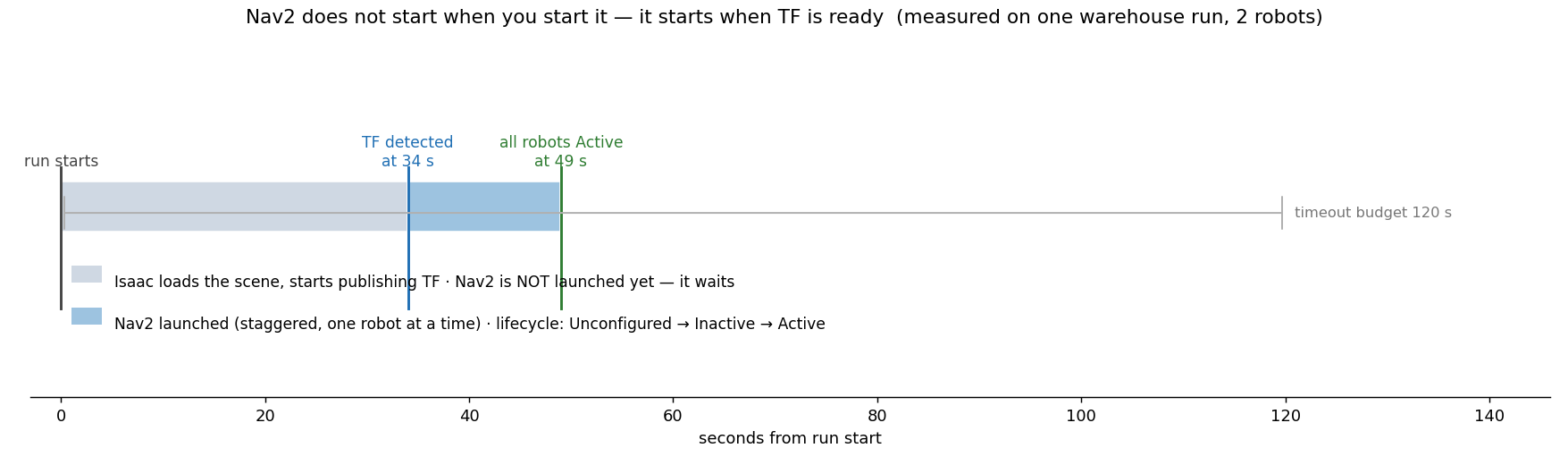 Nav2 boot timeline measured on one run. The first 34 seconds are Isaac loading the scene and beginning to publish TF, and Nav2 is not running at all during that window. Only once TF appears is it launched, one robot at a time, and reaching full lifecycle Active takes another 15 seconds. The wait is budgeted at 120 seconds.
Two things stand out. First, the 34-second wait is not wasted time — skipping it activates the costmap before it knows where it is, which produces exactly the tens-of-seconds stall warned about above. Second, the launch is staggered per robot: bringing several robots' Nav2 stacks up simultaneously makes DDS discovery and lifecycle transitions contend with each other.
💡 Duplicate registration trap — declaring the same BT node plugin twice in bt_navigator produces errors like
ComputePathToPose already registeredand prevents activation. Keep the plugin list free of duplicates.
Work Is Done by Trees — Behavior Tree
Once activation completes, a "navigate to goal" command executes through a Behavior Tree (BT). bt_navigator ticks the BT periodically, calling path planning, path following, and recovery in the order and under the conditions defined in the tree.
Rendering diagram…
The BT's strength is that failure handling is baked into the tree structure. When path following fails, control immediately branches to recovery (spin/backup) and then retries. The combination of simple "success / failure / running" signals is sufficient to express complex navigation behavior.
This structure is what allows the path planner and controller covered in the following posts to each focus on their own job — the BT handles the orchestration of when to call what.
In a nutshell
📌 Nav2 wakes up through its lifecycle order (map_server → … → bt_navigator, with TF ready at the right time), and once active, a Behavior Tree ticks to orchestrate planning, tracking, and recovery. "Robot does not move" traces almost always to activation order, TF, or BT configuration.
References
See standard test results with videos and verdict evidence on the imSim Portal.
View public results →